
Accounts Payable Meaning
Accounts payables refer to the money that a business owes to its vendors in the short term. Accounts payables are listed on a business’s balance sheet as a short-term or current liability.
Accounts payables could include payments to contractors or vendors who provided goods or services to the business on credit.
Managing accounts payables is very important to the financial health of the business. Most businesses choose to use software and automation to streamline the entire procurement process.
Importance of Accounts Payable
When businesses don’t have enough cash on hand to immediately pay their vendors, they can pay vendors at a later date, when cash is more readily available. This amount is recorded in the books of accounts as Accounts Payable.
Managing accounts payables is an important function of the finance and procurement teams. Here’s why:
- Timely payments ensure a healthy and improved relationship with suppliers, potentially leading to better terms, discounts, and extended credit lines.
- Good accounts payable management improves the business’s bottom line by improving savings and reducing costs through less errors, flexible payment terms and discounts.
- Businesses with good procurement and AP processes enjoy better compliance, streamlined processes and better overall financial health.
Recording Accounts Payable
How Accounts Payable is Recorded
The first record of AP is in the ledger: Accounts Payable is credited and the account of the good or service purchased is debited.
According to the rules of double-entry accounting, any transaction has to have equal debit and credit offsets.
When a purchase is made, a debit entry is made under “Purchases” (or a similar account name like “Inventory” or “Cost of Goods Sold”) to reflect the increase in goods or services received.
However, since the vendor has not yet been paid, this creates a liability. To maintain the double-entry balance, a credit entry is made under the “Accounts Payable” account. This shows the amount owed to the supplier for the goods or services acquired. These two entries, one debit and one credit, ensure financial records remain balanced and accurately reflect the impact of the transaction on the company’s assets and liabilities.
Once the payment is processed, the “Accounts Payable” account is debited and the “Cash” or “Bank” account is credited, signifying the settlement of the debt and the reduction in your liabilities.
Let’s say a bakery purchases flour from a vendor on credit.
This is how the flour account would look in the bakery’s ledger.
Flour A/C
Dr Cr
| date | transaction | amt (Rs) | date | transaction | amt (Rs) |
| 25-Oct-22 | To Accounts Payable | 20,000 | |||
The corresponding credit entry in the AP account would look something like this:
Accounts Payable A/C
Dr Cr
| date | transaction | amt (Rs) | date | transaction | amt (Rs) |
| 25-Oct-22 | By Flour A/C | 20,000 | |||
At the end of the accounting period, the bakery will transfer the total sum of money it owes to its vendors to the balance sheet as we saw earlier.
Example of Accounts Payable Record in General Ledger
Imagine a company purchases goods worth ₹50,000 from “ABC Suppliers” on October 31, 2023. The supplier issues an invoice number INV-12345. Here’s an example of how this transaction would be recorded in the general ledger:
| Date | Account | Debit | Credit | Description |
|---|---|---|---|---|
| October 31, 2023 | Purchases | ₹50,000 | As per invoice number INV-12345 from ABC Suppliers | |
| October 31, 2023 | Accounts Payable (ABC Suppliers, Invoice INV-12345) | ₹50,000 | Amount owed to ABC Suppliers |
Accounts Payable in the Balance Sheet
Condensed Consolidated Balance Sheets
| Particulars | June ‘22 | Mar ‘22 |
| Assets | ||
| Current Assets | ||
|
Cash and Cash Equivalents |
||
|
Accounts Receivable |
||
| Non-current Assets | ||
|
Property, plant, and equipment |
||
| Liabilities | ||
| Current Liabilities | ||
|
Accounts Payable |
||
| Non-current Liabilities | ||
|
Term debt |
Decoding Accounts Payable
In the balance sheet, businesses record the values of assets and liabilities for this accounting period and the last.
The payables metric is also recorded in the Cash Flow Account to understand the movement of the business’s cash. A business that is able to pay its vendors in cash and on time is a business that has good cash flow.
A high accounts payable balance means that the business has been unable to pay vendors in cash. This could be because of a number of reasons.
- Insufficient cash flow
- Initial stages of business
There are many possible reasons for this: a lack of management of funds, high expenses, poor budgeting, slow and tedious procurement processes resulting in delayed payments and penalties.
There’s one solution: automating procurement processes.
Accounts Payable Workflow Process
Accounts payable is a part of the larger procurement process. Read more about the procure to pay process here.
The accounts payables process includes:
- Invoice capture: Once an invoice is received from the vendor, its details need to be entered into the system. If done manually, this is a tedious, error-prone task. Automated solutions use OCR technology to auto-capture this information, ensuring 100% accuracy.
- Invoice approval: The next step is to get the invoice approved from department heads and the finance teams. This step too, is best when automated. Approval workflows allow all stakeholders to view and approve the invoice without delays.
- Payment approval: Once the invoice is approved, the payment must be approved. All details in various documents like the GRN, PO and the invoice must be verified in a comprehensive 3-way matching process.
- Payment disbursal: Finally, the payment is made to the vendor and recorded in the books of accounts. With solutions like RazorpayX Source to Pay, businesses can make thousands of payments at once without delays or errors.
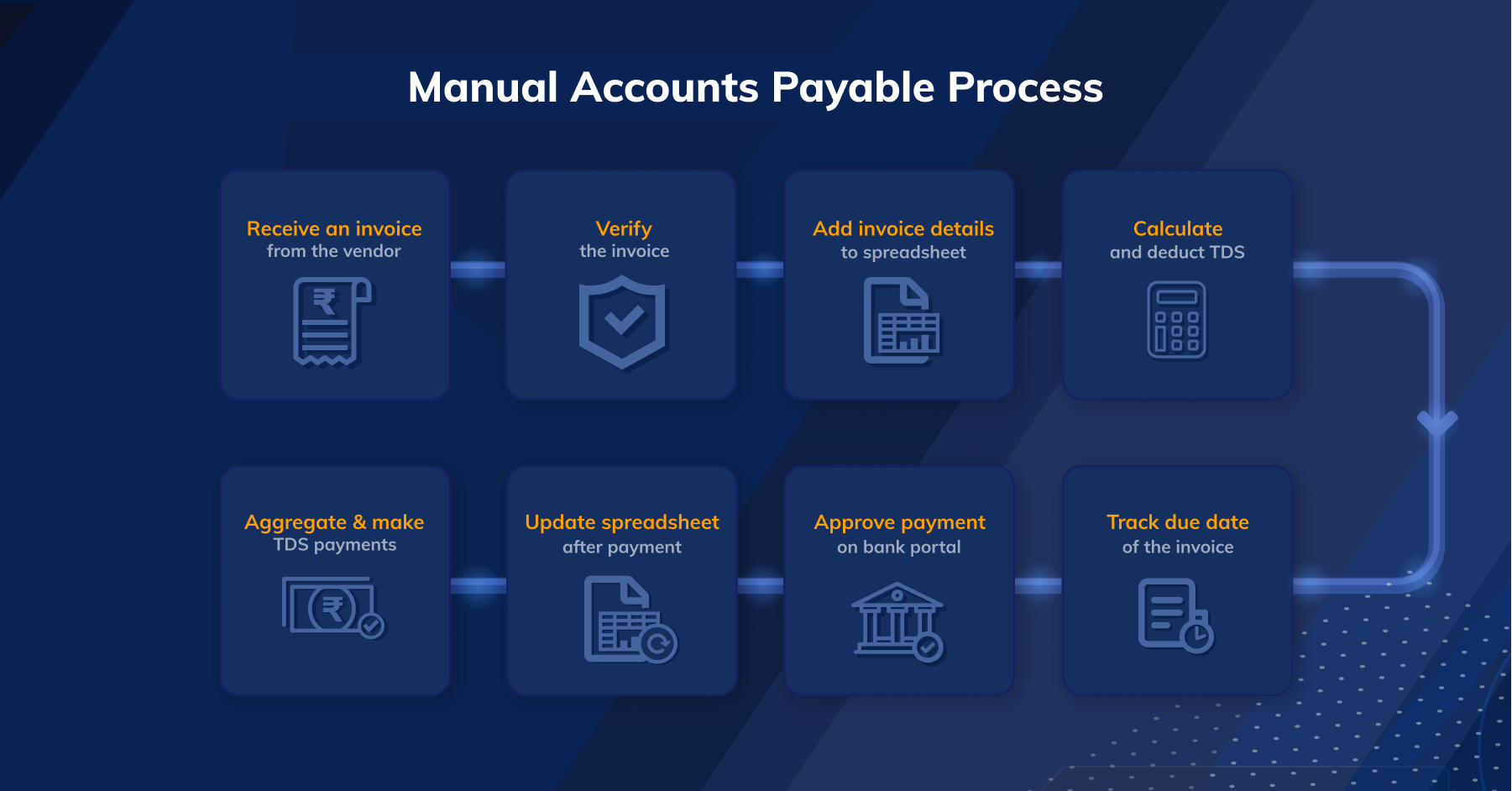
As shown in the diagram above, the process is long, tedious, and error-prone.
Example of Accounts Payable Expenses
Accounts payable expenses encompass a wide range of costs depending on the nature of business. Here are some common examples:
1. Inventory-related purchases:
- Raw materials used in production
- Finished goods purchased for resale
- Packaging materials
- Supplies used in daily operations
2. Services:
- Transportation and logistics costs (freight, shipping, delivery)
- Utilities (electricity, water, gas)
- Rent and property maintenance
- Professional services (legal, accounting, consulting)
- Marketing and advertising
- Insurance premiums
- Subscription fees (software, cloud services)
3. Other expenses:
- Office supplies
- Travel and entertainment expenses (reimbursed to employees)
- Repairs and maintenance
- Taxes (property, sales)
- Interest on loans
Why Should You Automate Accounts Payable?
Automating accounts payable processes saves time and reduces manual effort by streamlining tasks such as data entry, invoice processing, and approval workflows. Automation also improves accuracy by minimizing the risk of human error inherent in manual data entry and processing.
Furthermore, automated systems provide real-time visibility into the status of invoices and payments, offering better control over cash flow and liabilities. Enhanced visibility and control not only optimize internal processes but also strengthen relationships with vendors through faster processing times and fewer errors, ultimately improving overall satisfaction.
Lastly, automated accounts payable systems offer scalability, adaptability to remote work environments, and strategic insights. They can accommodate increased transaction volumes without requiring additional resources, making them ideal for growing businesses.
These systems often include analytics and reporting capabilities, providing valuable insights into spending patterns, vendor performance, and opportunities for optimization, thereby enabling informed decision-making and driving strategic growth.
Accounts Payable Managed
RazorpayX allows for end-to-end automation for adding, tracking, and clearing invoice and TDS payments.
All you have to do is upload an invoice on the RazorpayX Dashboard or forward the invoice sent from your vendor, and we take care of everything.
- Auto-Capture Invoice Details
Our intelligent OCR extracts and populates all the invoice details saving you the hassle of manual data entry and reducing the possibility of errors. - Pay your Vendors
You can make payments instantly via IMPS, UPI, NEFT, and RTGS or schedule them for a later date. - Auto-Pay TDS
RazorpayX automatically deducts and pays the applicable TDS before the due date. Not only that, you can view all the challans on the dashboard post-payment.
Automate Your Accounts Payable Now!

